Requirements Traceability Matrix is not only for requirements


Originally published June 14, 2019, updated April 23, 2021
When it comes to succesful test management, traceability of testing objects is one of the most important factors, as it facilitates development team members synchronize their work and communicate with each other on the highest level. The consequences of focusing on that functionality can only be positive. Thanks to implementation of the Traceability Matrix, the whole process of software testing speeds up, and the number of possible bugs significantly drops. In the end, you will release a complete product which will meet your customers’ needs. How to benefit from all these advantages during your software development? The first thing you need to do is bring your test management into Jira. Having Jira as your testing tool can turn out to be a perfect solution for your project for many reasons, and top traceability is undoubtedly at the forefront, especially when it comes to workflow organization.
The Jira Revolutions
By moving your test management into Jira, you only can win. If your team already manages their software project insideAtlassian suite (which is very likely, considering the fact that Jira owns a market share of about 33% in software configuration management), you won’t have to invest in any additional training for them, as testing process will become entirely integrated with the rest of the development. You’ll provide the team with a well-known environment to work in, so all actions will be intuitive and easy to implement. As it would be impossible to display all relations between the objects if the requirements specification, tests and test results were stored in separate files or programs, the ability to finally put them together sounds revolutionary, doesn’t it?
Jira basic features often aren’t enough for advanced users, as their projects tend to require more complicated solutions. That’s why there are a lot of test management tools designed to make testers’ work more efficient. One of them is our Requirements and Test Management for Jira (RTM). It makes the project scope transparent for all the team members and has a wide range of other functionalities. RTM allows to track the whole software project from end to end. Gathering requirements, assigning test cases to them, setting up test plans and verifying their executions, reporting defects, and coverage – you can do all that in a single place. Last but not least, our app lets you seamlessly link testing objects to Epics and users stories, and search for them like for regular Jira issues. Using RTM, you’ll get a complete and continuous process – what more can testing teams wish for?
What is the Matrix… and why do you need it
As Morpheus from the famous Matrix movie said: No one can be told what the Matrix is. You have to see it for yourself.
The quote from the famous movie can refer to the Traceability Matrix in Requirements and Test Management for Jira too, as it’s best to discover for yourself how much it can upgrade your project management. Don’t be afraid and dive into the world of RTM, where you can track all testing elements and make sure any detail won’t be omitted. If you’re still not convinced, let us lift the veil of secrecy for you. RTM Traceability Matrix is a special panel which lists issues of one type and verifies their associations with requirements, tests or defects. It also shows the total number of relationships for each issue and the percentage of coverage for both X and Y axes (columns and rows of the chart).
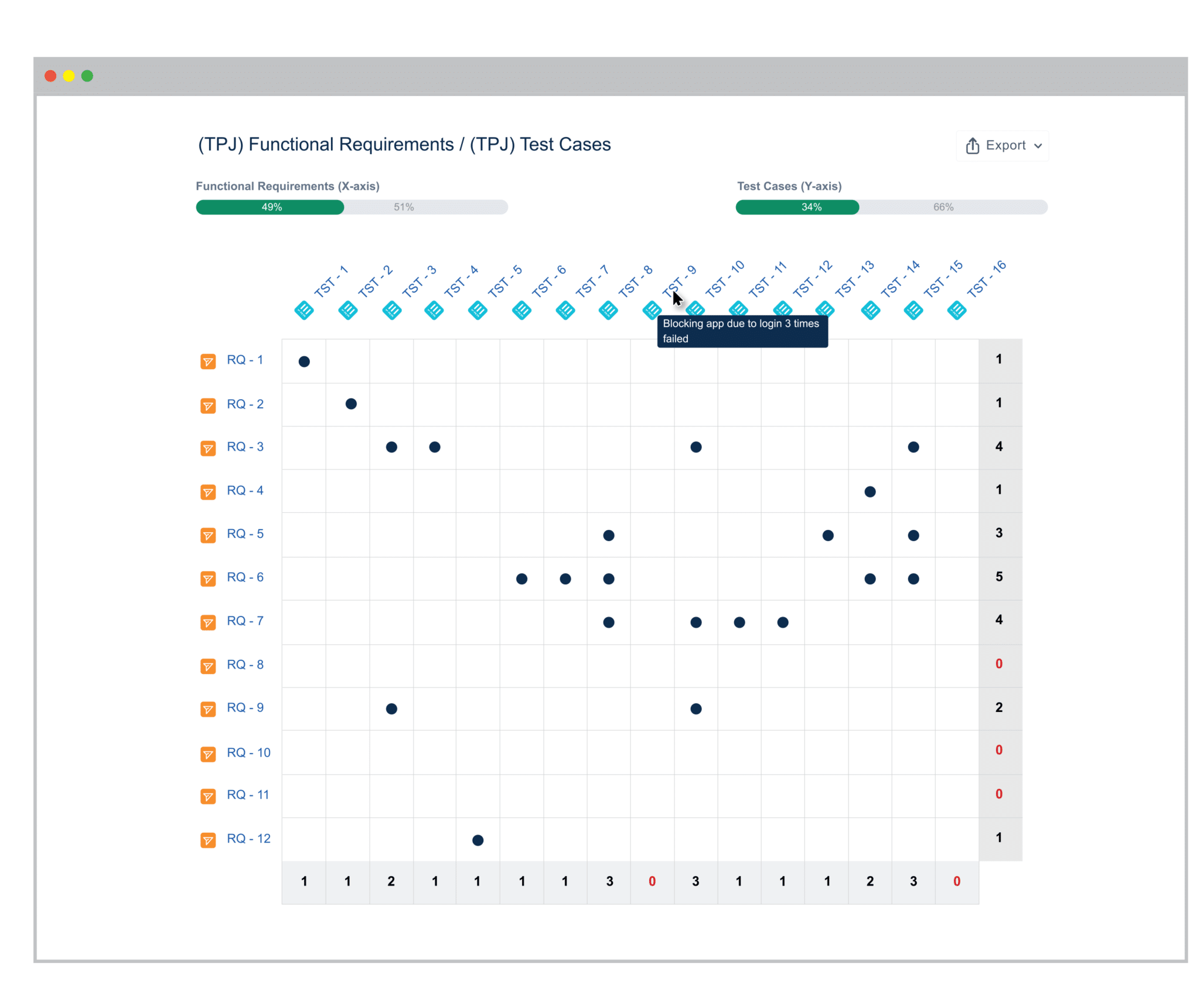
Thanks to the Requirements Traceability Matrix feature, we can track which objects are already covered or included in a superior category
How to use the Requirements Traceability Matrix
First of all, we need to choose which elements from which project we’d like to display on our X and Y axes. It’s possible to see relations between objects from different projects. RTM Traceability Matrix allows to choose among projects and Jira issue types from a drop down list (Requirements, Tests, Defects, but also stories, Epics, regular tasks and other issue types). Moreover, after clicking on Advanced settings, we’ll be able to use JQL to define which links and objects we’d like our table to present. When you’ll have your two baselined issue types and projects set up, just click Generate, and your customized Traceability Matrix will be ready.
If we’d like to see details of presented relations, we can hover over the link icon in our matrix, and required information will be displayed in a tooltip. According to our needs, we can see only covered or uncovered (included in or not) objects bychoosing Preferences symbol. In order to view a particular issue in Jira, we need to click on the target issue key. The Traceability Matrix allows to export data to a .csv file – all you have to do is choose an Export icon in the upper right corner of page.
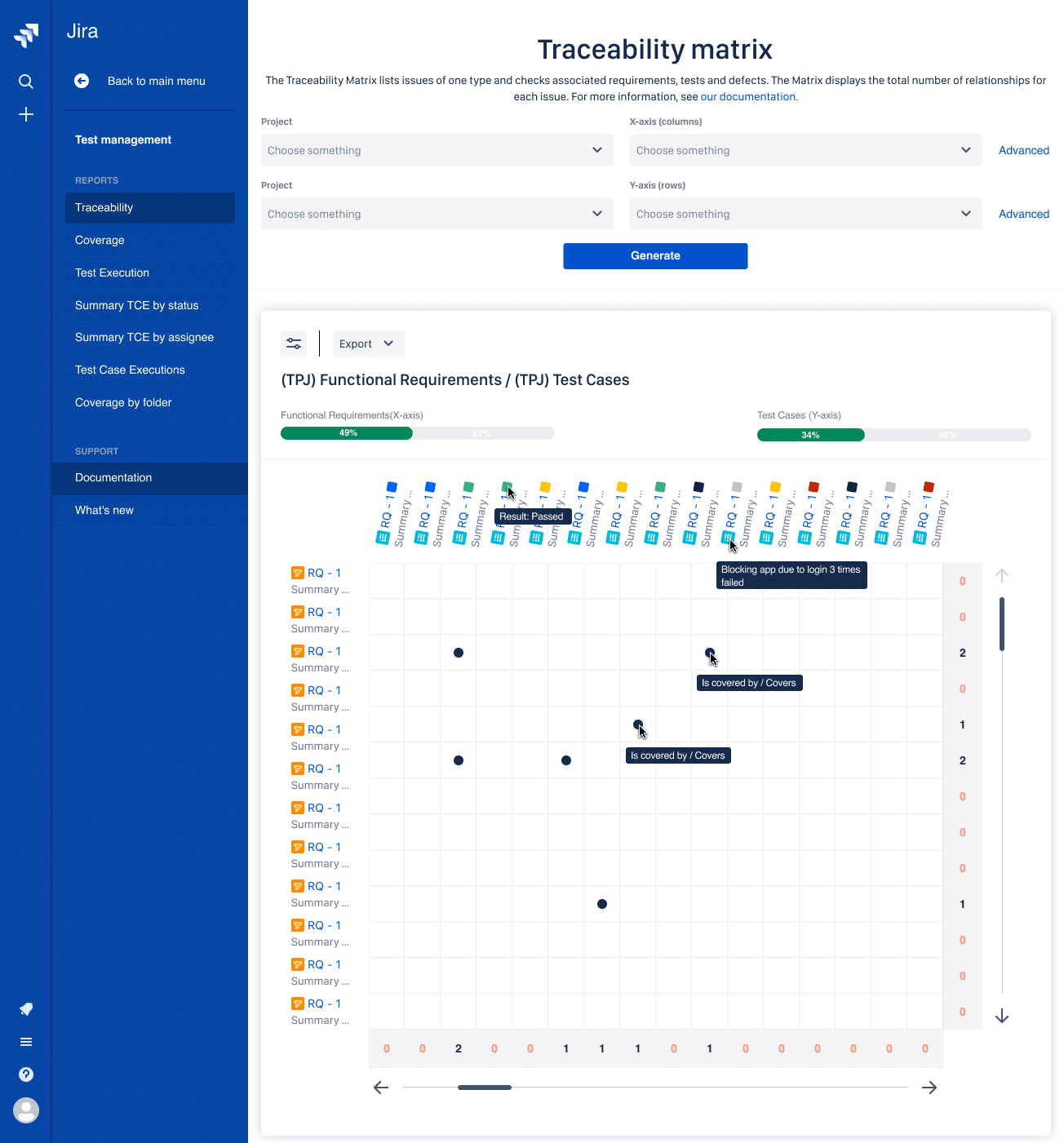
RTM Traceability Matrix displays relations of different types between all testing and Jira objects
Requirements traceability and more
We already know how to set up the matrix to make the most of it, now it’s time to answer the question what for and decide ifit’s worth our time and effort. In the first place, the Traceability Matrix is perfect for tracking requirements – test cases coverage. Requirements and Test Management for Jira (RTM) matrix allows to choose among all types of requirements (Functional Requirements, Non-functional Requirements, UI Requirements and Business Requirements) and displays only those we’d like to see at the moment. Linking requirements to test cases gets much more transparent which prevents possible bugs later on.
But RTM Traceability Matrix can show you more than just associations between requirements and test cases. It also lets you:
- make sure if all Test Cases are included in Test Plans and Test Executions;
- find Defects resulting from particular Test Cases and Test Executions;
- verify Test Executions linked to Test Plans.
We found the quote above very much to the point. Traceability Matrix is not all about requirements, it gives us many more tracking possibilities. As it was mentioned before, the table shows all links and relations set during testing process. If we analyze those connections and follow every phase step by step like GPS instructions, the number of defects in a final product will be reduced, so the project’s goal could be achieved at the minimum cost and time and maximum quality.
Key points
The most important reason why bringing your testing process into Jira will make yours and your team members’ life easier is the possibility of tracking connections between testing objects and Jira issues. RTM for Jira is a management app that organizes and tracks testing efforts within any Jira Cloud Project. This intuitive app helps you to systematize testing process and improve the quality of the final product. It also has a special feature, which allows to display relations in a transparent way, clear for each person participating in the process.
The Traceability Matrix presents a relationship comparison between two baselined issue tapes of our choice on a dedicated view. We can see at a glance which Test Cases cover which Requirements, if Test Plans are complete and well executed, andfinally if there are any Defects – if then it will be simple to spot and fix them, knowing from which requirements or tests they come from. Those are only a few possibilities that Requirements and Tests Management for Jira gives you – we invite you to discover more by yourself.
If you’d like to learn more about Requirements and Test Management for Jira, take a free 30-day trial from the Atlassian Marketplace.
Learn more on topic